01
Upload the statement batch
Add digital PDFs and set the requested period. Unsupported, scanned, or mixed-currency files are stopped with a clear reason—not guessed.
Ledgerbatch turns supported digital bank-statement PDFs into clean, traceable CSV transactions. Check every row against its source, resolve exceptions, and export with a complete review trail.
25 free pages every month No card required
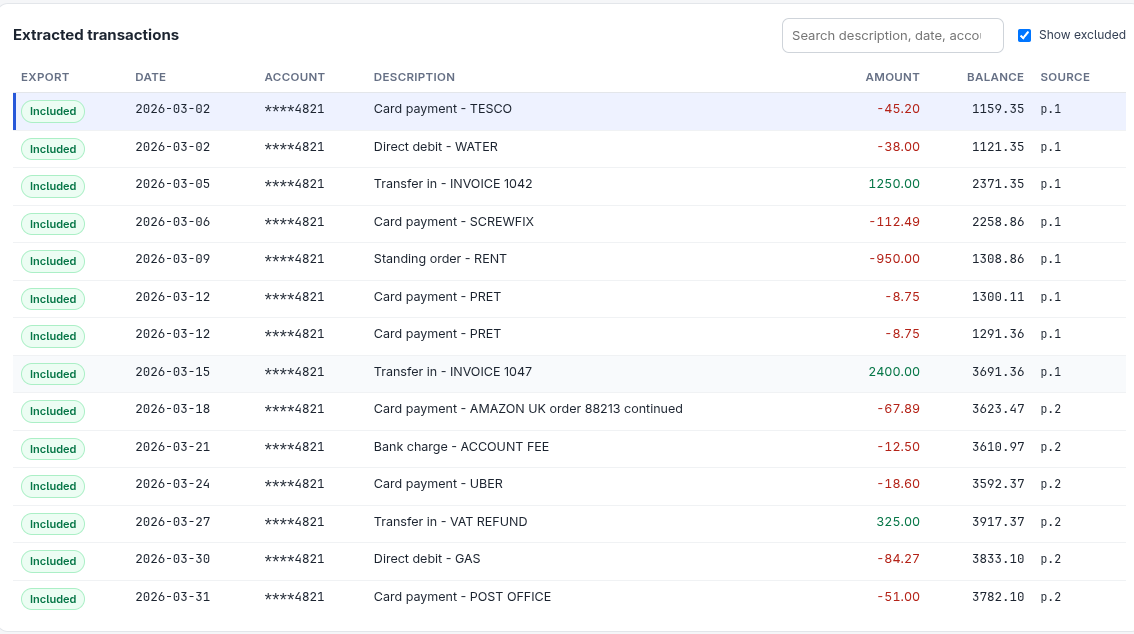
A source-linked bank statement cleanup tool—not a universal converter or an automated accounting service.
Ledgerbatch converts supported digital bank-statement PDFs into reviewed CSV transactions, with page-level source references and an exceptions and coverage report.
It is designed for bookkeepers and accountants handling historical statement cleanup who need to inspect transactions and defend the resulting export.
Only recognised, text-based PDF layouts. Scanned, encrypted, unknown, mixed-account, and mixed-currency files are rejected rather than guessed.
The Free plan includes 25 supported pages per month. Pro costs $49 per month for 300 supported pages, with no automatic overage charges.
Less time hunting for errors. More confidence in the file you hand over.
Add digital PDFs and set the requested period. Unsupported, scanned, or mixed-currency files are stopped with a clear reason—not guessed.
Click any transaction to see its exact region highlighted in the original statement. Resolve warnings and record corrections without overwriting raw values.
Confirm balances and coverage, approve the current revision, then download an immutable CSV snapshot with an exceptions and coverage report.
When a figure looks wrong, you are one click from the page and exact position it came from. Corrections stay separate from the raw extracted values, so the evidence remains intact.
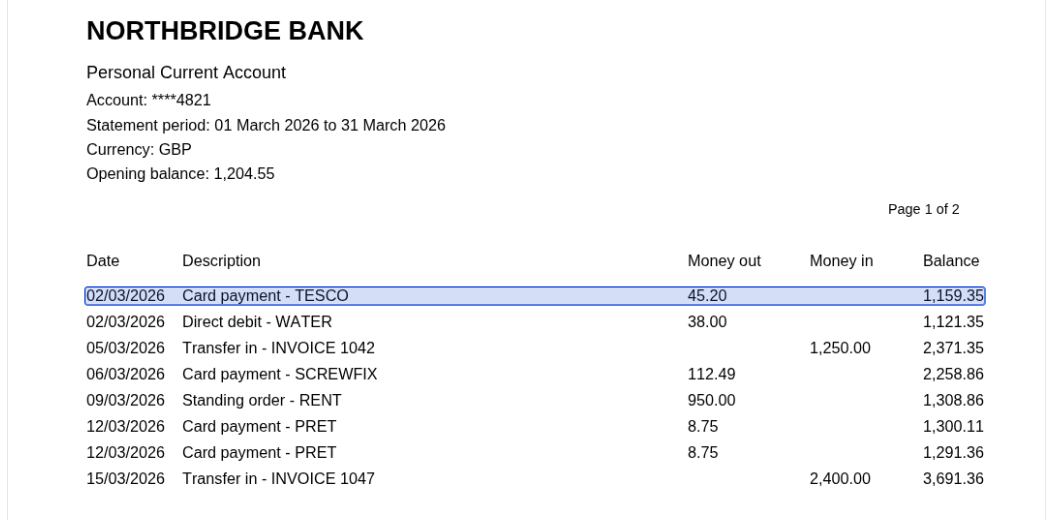
A working tool for supported digital-PDF layouts—not a magic converter that promises every bank.
Every correction records who changed what and why. Every export belongs to an approved revision, and any later edit requires approval again.
Ambiguous layouts are rejected with a reason. Ledgerbatch never invents rows or guesses at a bank format it does not recognise.
Closing balances, running balances, and printed totals are checked against the document. A pass is evidence, not a blanket promise.
Statements are financial records. Account isolation, clear retention windows, and straightforward deletion are built into the workflow.
Jobs, documents, and exports are scoped to your account—even with a direct ID, another user cannot open them.
Inactive jobs are deleted after 90 days on Free and 365 days on Pro, including uploads and exports.
Remove a job or your entire account at any time. No dark patterns or hidden retention window.
Every plan includes the full review workflow. You only pay for higher monthly volume and longer retention.
For trying the workflow and handling the occasional statement.
For bookkeepers turning statement cleanup into a repeatable workflow.
Payments, invoices, taxes, and refunds are handled by Paddle, our merchant of record. Cancelling stops future renewals; access continues to the end of the paid period.
Before you upload anything, here is what the tool does—and does not do.
Create a cleanup job and upload a supported digital PDF. Confirm the account and currency, review extracted rows against the source pages, resolve any warnings, and approve the current revision. You can then download a normalized CSV with full provenance or a Xero-shaped CSV, plus the exceptions and coverage report.
Versioned digital-PDF layouts are supported, including several UK current-account forms and withdrawals/deposits/balance statements. Scanned or image-only PDFs are rejected because there is no OCR. Unknown layouts are rejected rather than guessed.
No. Ledgerbatch uses deterministic, versioned layout adapters and preserves each transaction’s source location. It does not invent rows to make totals match, and unknown layouts are rejected. Balance checks provide evidence for review, not a guarantee that every row is correct.
Uploads stop until the next billing period. There is no automatic overage charge. The usage meter in the app shows pages used against the allowance.
A Xero-shaped profile was imported successfully into the Xero Demo Company (Global) on 2026-11-09. That verifies the demo importer path only; regional templates and live organisations are not claimed. Always verify an export against your accounting records before relying on it.
Yes—delete a job, or your entire account, from the app. Files are removed immediately; encrypted backups rotate out within 14 days.
Paddle is the merchant of record for Pro subscriptions. See the refund policy for the 14-day window and how to request one.
Create an account, try the review flow with a synthetic sample, and see exactly where every number comes from.
Clean up your first statement